Showing posts with label touch. Show all posts
Showing posts with label touch. Show all posts
Sunday, April 5, 2015
HTC M8 photographed from the front without soft touch buttons
The HTC M8 has been photographed from the front showing a lack of soft touch navigational buttons.

Read more »
Although these pictures may well be fake, and it wouldn’t take a PhotoShop pro to do so, they do back up a lot of the leaked information around the HTC M8.
The images were discovered by Russian site, MobilTelefon.RU, but have since been removed, which either adds strength to their authenticity or the site discovered they were mere works of fiction.
If they are the real deal, the HTC M8 or HTC One 2 will have a larger screen with reduced bezels to give it an edge-to-edge feel.
The HTC M8 is also missing the navigational buttons that were located beneath the display of the HTC One. Instead the navigational buttons are located on-screen.
In one of the images though, the navigational buttons are missing completely, suggesting that they can be hidden when not in use.
However, in the image where they are on display, it looks as though the HTC M8’s wallpaper has been resized to accommodate them, rather than them just appearing as a translucent overlay as you would expect.
This seems like a rather unlikely move from HTC and such whiffs of an enthusiast’s skills with some computer software.
Overall, the design looks “strikingly like” the HTC One as suggested by notorious tipster @evleaks, including the metal speaker grills at the top and bottom and the location of the front facing camera.
It may well be that these distinct similarities give away the inauthenticity of the images, and enable them to look so real without much hard work on the part of the leaker.
We’re bound to find out sooner or later what the HTC M8/One 2 will look like, as it is expected to be officially announced in March at a special New York event.
Smartphones tips and tricks Tablets tips and tricks Smartphones reviews
Smartphones rooting Tablets reviews News from mobile world
Smartphones rooting Tablets reviews News from mobile world

Wednesday, September 17, 2014
Touch ID only the beginning Cook says Apple intrigued by mobile payments
Apples old staples are selling well enough, but questions always swirl about what "one more thing" Cupertino has planned next.

One of the most recent reports about an area of interest for Apple is the mobile payments space, and CEO Tim Cook brushed on the possibility during the companys earnings call.
Cook, who refrained from levying the calls opening remarks as he normally does and stuck to fielding questions, called mobile payments in general an area "weve been intrigued with, and that was one of the thoughts behind Touch ID."
"So I dont have anything specific to announce today, but you can tell by looking at the demographics of our customers, and the amount of commerce that goes through iOS devices versus the competition, that its a big opportunity for the platform," he concluded.
It certainly is: Apple has access to millions of users payment information, not to mention their fingers at the ready to punch in purchases.
Throw in Touch ID, an "incredibly simple and easy and elegant" way to buy things Cook said consumers have gravitated to, and it looks like Apple has the fruit to turn an intriguing idea into some dollar-making juice.
Mobile payments werent the only future tech Apple hinted at.
"Hinted at" may be too generous - lets just say Apple is working on something weve yet to see from it, though what that something is remains as close to the vest as ever.
CFO Peter Oppenheimer said in prepared remarks that Apple is investing heavily in R&D for future products and services, though he didnt elaborate on what those could be. Corporate Controller Luca Maestri also teased that the company is investing "in areas that are not visible," adding the company is "very excited about them."
When pressed on what Maestri meant, Cook expanded his comments, explaining that Apple is "working on things that are not shipping today. Things you cant see today."
Read more »
One of the most recent reports about an area of interest for Apple is the mobile payments space, and CEO Tim Cook brushed on the possibility during the companys earnings call.
Cook, who refrained from levying the calls opening remarks as he normally does and stuck to fielding questions, called mobile payments in general an area "weve been intrigued with, and that was one of the thoughts behind Touch ID."
"So I dont have anything specific to announce today, but you can tell by looking at the demographics of our customers, and the amount of commerce that goes through iOS devices versus the competition, that its a big opportunity for the platform," he concluded.
It certainly is: Apple has access to millions of users payment information, not to mention their fingers at the ready to punch in purchases.
Throw in Touch ID, an "incredibly simple and easy and elegant" way to buy things Cook said consumers have gravitated to, and it looks like Apple has the fruit to turn an intriguing idea into some dollar-making juice.
But what else is next?
Mobile payments werent the only future tech Apple hinted at.
"Hinted at" may be too generous - lets just say Apple is working on something weve yet to see from it, though what that something is remains as close to the vest as ever.
CFO Peter Oppenheimer said in prepared remarks that Apple is investing heavily in R&D for future products and services, though he didnt elaborate on what those could be. Corporate Controller Luca Maestri also teased that the company is investing "in areas that are not visible," adding the company is "very excited about them."
When pressed on what Maestri meant, Cook expanded his comments, explaining that Apple is "working on things that are not shipping today. Things you cant see today."
Friday, May 16, 2014
How To Install Flash Carliv Touch Recovery CWM in Micromax A117 Canvas Magnus
Micromax A117 Canavs Magnus gets a CWM Recovery, oh sorry, not cwm recovery but Carliv Touch Recovery.
Carliv Touch Recovery is popular among MediaTek Android devices because it can be ported to almost any MediaTek device without any decompiling and other things. Credits goes to Carliv for making this simple tool and yuweng for his excellent work on his recovery. This is latest recovery complied by Carliv and there are all features which a recovery should have liek touch, nandroid, swipe etc. The recovery is touch based recovery so no need for touching your buttons and thats the best part of the recovery. Not only the touch feature, but you get swiping feature, touch-to-flash-rom feature, Nandroid backup, Nandroid backup deleter (in the recovery itself), backup format changer, Aroma File Explorer and other tons of special features in it. Let me show you aggregate features of Carliv Touch Recovery.

Features


.png)
.png)
Carliv Touch Recovery is popular among MediaTek Android devices because it can be ported to almost any MediaTek device without any decompiling and other things. Credits goes to Carliv for making this simple tool and yuweng for his excellent work on his recovery. This is latest recovery complied by Carliv and there are all features which a recovery should have liek touch, nandroid, swipe etc. The recovery is touch based recovery so no need for touching your buttons and thats the best part of the recovery. Not only the touch feature, but you get swiping feature, touch-to-flash-rom feature, Nandroid backup, Nandroid backup deleter (in the recovery itself), backup format changer, Aroma File Explorer and other tons of special features in it. Let me show you aggregate features of Carliv Touch Recovery.
Features
- Can be ported to any MediaTek based android device easily.
- Touch support- so no need to touch your buttons.
- Touch buttons (you can use on screen touch buttons like in ICS/JB ROMs too!)
- Change backup format- you can change the backup format like .ext4, .img etc.
- Aroma File Manager- use your SD Card, view files on your SD Card, System partition, data and all partitions, also you can delete any of them (thanks to amarullz for his fantastic work)
- Nandroid backup- backup your current ROM (system, data, boot, recovery and other partitions)
- Swiping feature- swipe up, down, left or right for moving in recovery.
- Delete Nandroid backup in recovery itself.
Requirements
- A Rooted Micromax A117 Canvas Magnus: Click HERE.
- Battery charged up to 70%.
- Simple knowledge of installing and using Android applications.
- MobileUncle MTK Tools.
Get it here:
Please note..
I am not responsible if you bricked your Canvas Magnus while performing the tutorial in this website. I hold no responsibility for it. You may make a backup by MTK Droid and tools for a safety purpose but it is tested by many users so you can also give it a shot. After flashing recovery, whatever you flash, I wont help you in that but make sure to make a Nandroid backup before flashing anything.
Downloads
- Carliv Touch Recovery image: Please click here to download carliv recovery 6.0.44 for Micromax A117 Canvas Magnus
Screenshots
Thanks Carliv for providing us the screenshots!
The recovery is based on CWM recovery so you also get features of ClockWorkMod Recovery too.
How To Install Carliv Touch Recovery in Micromax A117 Canvas Magnus
- Download the recovery.
- Rename it to recovery.img (make sure theres a .img extension with it.)
- Push it to your External SD Card of Canvas Magnus.
- Open MobileUncle MTK Tools.
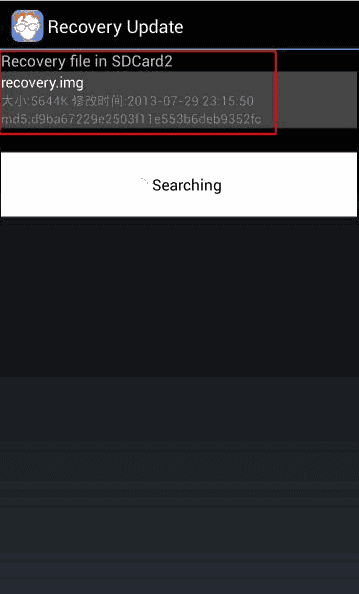
- Click on Recovery update.
- It will automatically find the recovery in your SD Card.
- Click on recovery.img and it will give you a warning to flash it or not.
- Press OK.
- It will start flashing the recovery.
- When it will complete, it will display a message on reboot to recovery? Press OK. [optional]
- You will be in the recovery. Now open Backup and restore and click on backup. [optionl]
- Go back and click on Reboot system. [optional]
- DONE!
Now you are done with the recovery. Do anything with it but make sure you are backed up and do not format any partition if you dont know what does it means!! Especially preloader. You can also try many mods like Kings Booster etc. but make sure you are backed up! Have a good day and stay tuned to us.
Subscribe to:
Posts (Atom)